The questions that come to mind first are almost never the ones worth asking. This guide gives you 45+ survey questions you can copy straight into your own survey, grouped by what you want to find out rather than by question type.
Wording is what decides whether anyone answers at all, and a badly worded question fails quietly. It does not bounce or error. It comes back with replies that look fine and mean nothing, and you usually discover that weeks later, when somebody asks what the results actually showed.
Every group below covers one thing you might want to learn, from what to change about a product to why somebody nearly left. Each group tells you when to send it, and which questions to keep first if you have to cut the list down to fit. Nothing here needs rewriting before you use it.
Table of Contents
- Why Start From Example Questions Instead of Writing Your Own
- How to Read the Answer Formats in This Guide
- Survey Question Examples by What You Want to Learn
- Four Wording Mistakes That Spoil the Answers
- Which Questions to Use for a Specific Audience
- How to Run These Questions on a WordPress Site
- FAQs About Survey Question Examples
Why Start From Example Questions Instead of Writing Your Own
Writing a survey question from scratch takes about a minute. Writing one that people answer the way you intended takes longer, because you have to work out in advance every way the wording could be misread. Skip that step and nothing warns you: the survey runs, the replies arrive, and only then does it turn out they cannot be used.
Three failures are worth knowing by name, because they are the ones you can check for before you send anything:
- Two questions in one. A single answer cannot address both, so neither half is usable.
- An answer format that does not fit the question. People pick the least wrong option, and it lands in your results looking like a preference.
- An assumption about the person answering. If the question takes something for granted that is not true of them, they either guess or close the survey.
Starting from a question that already works removes all three problems before you write a word. What you need from an example is wording you can paste in, an answer format that fits it, and a reason to keep the question in your survey rather than cutting it when the list gets long.
That last part is what most example lists leave out. Every question below is grouped by what you want to learn rather than by question type, because the decision you are actually making is not “should this be multiple choice” but “do I need to know this.” Our survey templates, built for UserFeedback, the WordPress survey plugin, take the same idea further and give you finished sets organized by audience. Use those if you want a whole survey. Use this page if you want to build one question by question.
How to Read the Answer Formats in This Guide
Every question below has its answer format in square brackets after it, like [Star rating] or [Long answer]. These are standard survey answer formats rather than shorthand invented for this page, so a question you copy from here will map onto whatever survey tool you already use.
Every question in this guide uses one of these seven formats:
- [Star rating] handles anything scored on a 1 to 5 scale.
- [Radio buttons] is a single-select list, including plain Yes and No.
- [Checkboxes] is the same thing when people can pick more than one.
- [Long answer] is a free text box for anything you want in the person’s own words.
- [Single text field] is one line, for short factual answers.
- [Net Promoter Score] is the 1 to 10 recommendation scale, which has its own reporting and is worth keeping separate from a star rating.
- [Email capture] is a field for an email address, for when you intend to follow up on the answer.
Where a question needs specific answer options, they are listed with it. If you would rather browse by the kind of survey you are running than by what you want to learn, our roundup of online survey examples covers the same ground from that direction.
Not sure which answer format to use?
Our question types guide explains what each format does and which one suits a given goal. For agree and disagree statements, which run on a scale of their own and are easy to get wrong, start with our scale examples and questions instead.
Survey Question Examples by What You Want to Learn
Six groups follow, each built around a single thing you might want to find out. Take whole groups if the goal matches yours, or take individual questions and build your own set. Nothing here depends on the group it sits in.
One piece of advice that applies across all six: put the rated questions first and the open ones last. Rating something takes a second and typing takes a minute, so a survey that opens with a text box loses people who would happily have answered five quick questions.
Product Improvement Questions
This group is for deciding what to change next. It covers what people value, what they avoid, and what stopped working the way they expected. If you want a whole survey rather than individual questions, our walkthrough on how to make a product feedback survey assembles one end to end.
The order matters here. Two ratings open the set because they are quick to answer, the frequency question sits third, and the three open questions come last, once somebody has already invested enough to type.
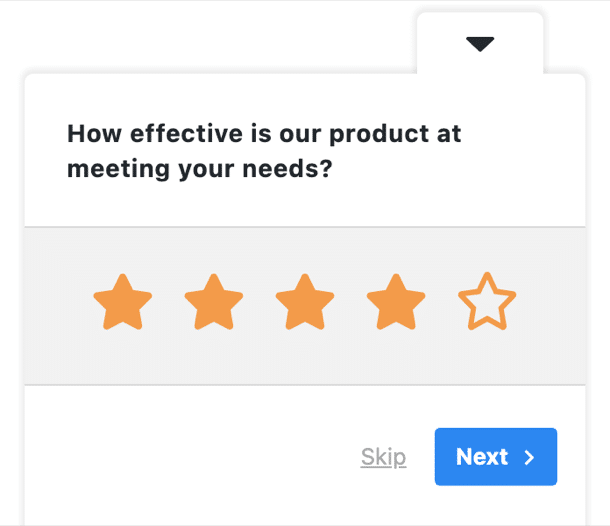
- How effective is [product] at meeting your needs? [Star rating]
- How easy is [product] to use? [Star rating]
- How often do you use our product? [Radio buttons] Options: Daily / Weekly / Monthly / Less often than that
- Which part of [product] do you use most? [Radio buttons] Options: swap in your own main areas, plus Something else
- What features do you find most valuable in our product? [Long answer]
- What else should [product] do? [Long answer]
- What is the hardest part of using [product]? [Long answer]
- What were you trying to do the last time [product] got in your way? [Long answer]
Send: by email to people who have used the product for at least a month, since most of these need real use behind them. On-site, eight questions is far too many for a widget, so take questions 1, 3 and 7 and keep the rest for email.
Frequency changes how you read everything else here. A daily user describing a setup problem is describing a memory from months ago, and a first-week user describing the same problem is describing their present. One of those is worth fixing this quarter, and the other belongs in a backlog with a note about when it was reported. Question 3 asks for one answer and tells you which of the two you are reading.
Most product feedback shows up with no scenario attached, which is exactly what makes it hard to act on. A reply saying the reporting is confusing could mean any of twenty things. The last question asks for the moment rather than the opinion, and answers tend to name a specific screen and a specific goal, which gives you something you can go and look at yourself.
Feature Request Questions
Use this group when you already have candidate features and need to rank them. It is not built for collecting ideas, and it works badly if you have none of your own to test.
Every question here except the last two asks about features you name, so fill in your own before you send it. The set is short on purpose, because ranking exercises lose people fast.
- How important is [specific feature] to you? [Star rating]
- Which of these features matter most to you? [Checkboxes] Options: list your candidates, four or five at most
- Would [hypothetical feature] improve your experience with our product? [Radio buttons] Options: Yes / No / Not sure
- How likely are you to use [specific feature] if we build it? [Radio buttons] Options: Very likely / Fairly likely / Not sure / Fairly unlikely / Very unlikely
- If you could have one new feature, what would it be? [Long answer]
- What are you using instead of [feature] today? [Long answer]
- Would you like us to email you when [feature] ships? [Email capture]
Send: by email to active users, or on-site to people who have just visited a pricing or feature page. Two questions is the practical limit on-site, and questions 2 and 6 are the pair that earns its place.
The workaround somebody has already built is the strongest signal in this group. Stated importance tells you what people say they want, and question 6 tells you what they wanted badly enough to solve themselves with a spreadsheet, a second tool, or a manual process every Friday. Where the two disagree, treat the workaround as the better guide to what to build.
An email field belongs at the end of a feature-request survey rather than the start. The person has just spent four questions telling you what they want from you, so asking how to reach them reads as a natural follow-up. Put the same field first and the whole thing reads as a lead-capture form with some questions bolted on, and your completion rate shows it.
Post-Purchase Questions
Ask these after an order completes, while the details are still recent enough to recall accurately. Our roundup of post-purchase survey questions goes deeper if this is the only group you need.
Three ratings, one yes-or-no, then the open questions. The rating questions are the ones you can trend over time, so keep their wording fixed once you have sent the survey twice.
- How would you rate your checkout experience? [Star rating]
- How well did the product match what you expected? [Star rating]
- How likely are you to buy from us again? [Star rating]
- Did you find the product descriptions helpful? [Radio buttons] Options: Yes / No
- How did the ordering process go for you? [Long answer]
- What information did you look for before ordering? [Long answer]
- What would have made checkout easier? [Long answer]
Send: by email within a day of the order, before the delivery arrives, so the answers are about buying rather than about the product. Questions 1 and 4 also work on-site on the order confirmation page, where somebody is already stopped.
Questions 1 and 2 sound similar and measure different things. One is about the process of buying and the other is about the thing bought. A store can have a smooth checkout and a product that disappoints, or the reverse, and if you only ask one of the two you will read the wrong problem into a low score and go and fix the wrong thing.
Buyers research before they buy, and question 6 is the only one here that finds out where they looked and came away without an answer. The replies usually name a page you already have, which tells you the information exists and is not where people expect to find it. That is a cheaper fix than writing anything new.
Market Research Questions
This group asks about the market rather than about you, which means it works with people who have never bought from you and have no opinion of you yet. Pair it with a market research tool if you are running it at any scale.
Because none of these depend on being a customer, this is the one group you can put in front of cold traffic. Keep the brand questions together and the price question last, since price is where people abandon a survey.
- How often do you buy [product category]? [Radio buttons] Options: Weekly / Monthly / A few times a year / Once a year or less
- What factors influence your purchasing decisions the most? [Checkboxes] Options: Price / Quality / Speed / Support / Recommendations / Something else
- How did you first hear about us? [Radio buttons] Options: Search / Social media / A friend or colleague / An ad / Somewhere else
- Which brand do you use most often? [Single text field]
- What made you choose that brand? [Long answer]
- How satisfied are you with the options available today? [Star rating]
- In an ideal [product category], what matters most? [Long answer]
- What would make you switch to a different [product category]? [Long answer]
- How much would you expect to pay for [type of product]? [Radio buttons] Options: use bands that do not overlap
Send: by email to a list, or on-site to visitors who have not bought anything. Nine questions is an email survey, not a widget. If you want an on-site version, questions 2 and 4 stand alone perfectly well.
Question 3 is worth keeping even when you cut the set down, because it is the only question here that a customer can answer better than your analytics can. Attribution tools see the last thing somebody clicked. This asks what they actually remember, and the gap between the two answers is usually where your marketing budget is being misread.
Questions 4 and 5 are deliberately separate. Asking which brands somebody prefers and why in a single question gives you one text box holding two unrelated answers, so you cannot count the first or read the second properly. Splitting them asks slightly more of the respondent and gives you a countable list alongside a readable reason. Question 4 is a text field rather than a list because naming every competitor in your options is both impractical and a hint about who you are worried about.
Price bands are the easiest place to write overlapping options by accident. Ranges written as 20 to 30 and 30 to 40 leave anybody at exactly 30 guessing which one to pick, and their guess arrives in your data looking like a real preference. Write the bands so they cannot overlap, and include a top band with no upper limit so nobody is forced downward.
Website and App Experience Questions
These ask about the site itself rather than about the person answering, so they suit anybody who arrives, customer or not. Our list of website usability survey questions covers the same territory in more depth.
This is the group most worth running on-site rather than by email, because the person is looking at the thing you are asking about. That also means you should ask two questions at most in any one place.
- How easy was it to find what you needed on our website? [Star rating]
- How easy was it to find what you needed in our app? [Star rating]
- How would you rate the design of our website? [Star rating]
- Did you run into any problems while using our site? [Radio buttons] Options: Yes / No
- Did anything on this page confuse you? [Radio buttons] Options: Yes / No
- What were you looking for when you arrived today? [Long answer]
- What did you enjoy most about using our site? [Long answer]
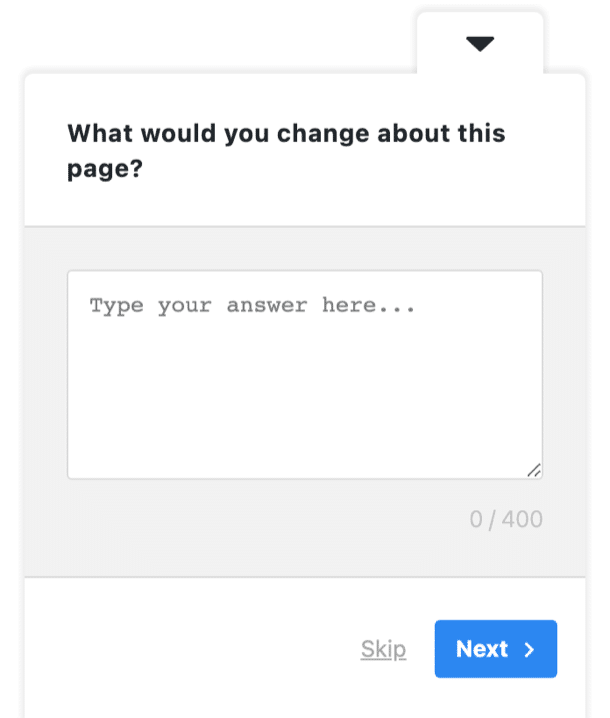
- What would you change about this page? [Long answer]
- What might bring you back to our site? [Long answer]
Send: on-site, and split across pages rather than shown as one survey. Questions 5 and 8 belong together on a single page, question 6 works best as an exit question, and question 2 should only appear to people who actually have your app.
A website and an app are different surfaces with different problems, which is why the first two questions are separate rather than one question naming both. Somebody who finds your site easy and your app impossible has told you something specific and useful, and a question covering both at once leaves you unable to tell which of the two to fix first.
A yes-or-no question earns its place only when something follows it. Question 5 works because question 8 sits next to it, so an answer of Yes leads the person straight to a box where they can say what confused them. Asked on its own, the same question produces a percentage and no way to act on it.
Somebody who tells you what they came for has given you the most useful answer on this page, because every other reply can be read against it. A visitor who came to compare pricing and a visitor who came to file a support request want completely different things from the same page, and question 6 tells you which of them you are hearing from before you act on anything else they said.
Satisfaction and Loyalty Questions
Keep this group short. Satisfaction wording is a subject of its own, and our guide to customer satisfaction survey examples is the place to go for a full set rather than the seven questions here.
All four ratings come first and the open questions follow, which is the standard shape for this kind of survey. Ask them on a schedule rather than in response to an event, so the numbers stay comparable.
- How satisfied are you with our product? [Star rating]
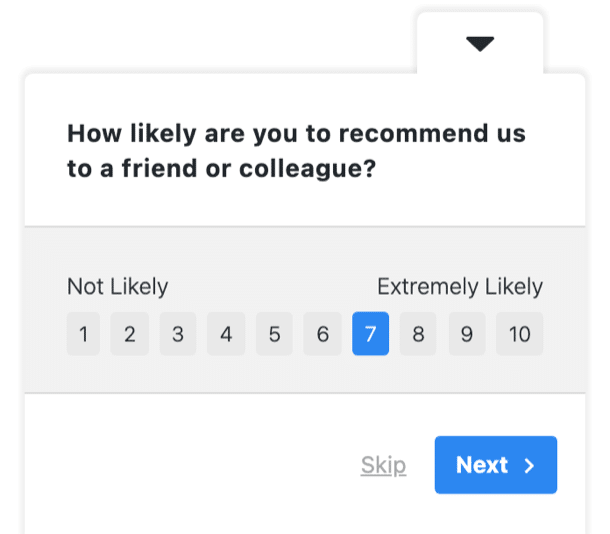
- How likely are you to recommend us to a friend or colleague? [Net Promoter Score]
- How likely are you to still be using [product] in a year? [Star rating]
- How would you feel if you could no longer use [product]? [Radio buttons] Options: Very disappointed / Somewhat disappointed / Not disappointed
- What are you most satisfied with? [Long answer]
- What can we do to improve your experience? [Long answer]
- What would make you stop using [product]? [Long answer]
Send: by email, quarterly, to the same segment each time. This is the one group where consistency matters more than timing, because the value is in the change between rounds rather than in any single result.
One question here needs its format named precisely. The recommendation question runs on a 1 to 10 scale and reports as promoters, passives and detractors, which is a different calculation from averaging stars. Put it on a star rating by mistake and the number you get is not a Net Promoter Score, whatever you end up labeling it in your dashboard.
Question 4 is the strongest in this group and the least obvious. A satisfaction rating tells you how somebody feels today, and it flattens the difference between a customer who likes you and a customer who could not easily replace you. Those two people give you the same four stars and behave completely differently when a competitor calls. The ones answering “very disappointed” are the ones whose written answers are worth reading first.
Four Wording Mistakes That Spoil the Answers
Before you paste anything into a survey, it helps to know what a question needs to get right. A question worth asking does three things: it asks about one thing, its answer format matches what it asks, and it assumes nothing about the person answering. Test anything you write yourself against those three, then against the four failures below.
Two things in one question. Anything containing “and” or “or” is worth a second look. “How would you rate the design and layout of this page” cannot be answered by somebody who likes one and not the other, and the reply you get will be an average of two opinions you needed separately.
A leading adjective. Describing your own product inside the question tells people what to say. “How would you rate our improved dashboard” invites a better score than “how would you rate the dashboard,” and the difference is your wording rather than their opinion.
An absolute. Words like always and never force people into a position they do not hold. Somebody who reads your newsletter most months will answer no to “do you always read our newsletter,” and you lose a regular reader in the data.
An unbalanced set of answers. A scale running from Acceptable to Outstanding has no way to say the thing was poor, so a poor score arrives as Acceptable and your average looks healthier than the truth.
There are more than four, and getting this right matters more than the length of your question list. Our guide to bad survey questions and how to fix them works through eight types with a broken and a corrected version of each.
Want to ask these on your own site?
Paste any group from this page into a WordPress survey, pick the answer format for each question, and choose when it appears. No developer, and nobody has to leave your site to answer.
Which Questions to Use for a Specific Audience
If you already know who you are asking, start from the audience instead. Each of these is a finished set rather than a pick-and-mix.
- Customers. Our guide to customer survey questions covers experience, product and brand in one place.
- Anyone who has contacted support. Our list of customer service survey question examples is written for that conversation.
- Visitors rather than buyers. Our survey templates are grouped by audience.
- Measuring satisfaction, not wording it. Start with customer satisfaction survey examples.
Mixing a group from this page into one of those sets works fine. Running two surveys at once on the same page does not: the second gets dismissed, and you lose a response you would have had.
How to Run These Questions on a WordPress Site
A list of questions is only useful once it is in front of somebody. UserFeedback puts these questions on your WordPress site as an on-page survey, without a developer and without sending visitors somewhere else to answer.
What matters for the questions above:
- Unlimited surveys and questions. You can build as many surveys as you want, with as many questions in each as you need, so a long list like this one does not have to be trimmed to fit a limit.
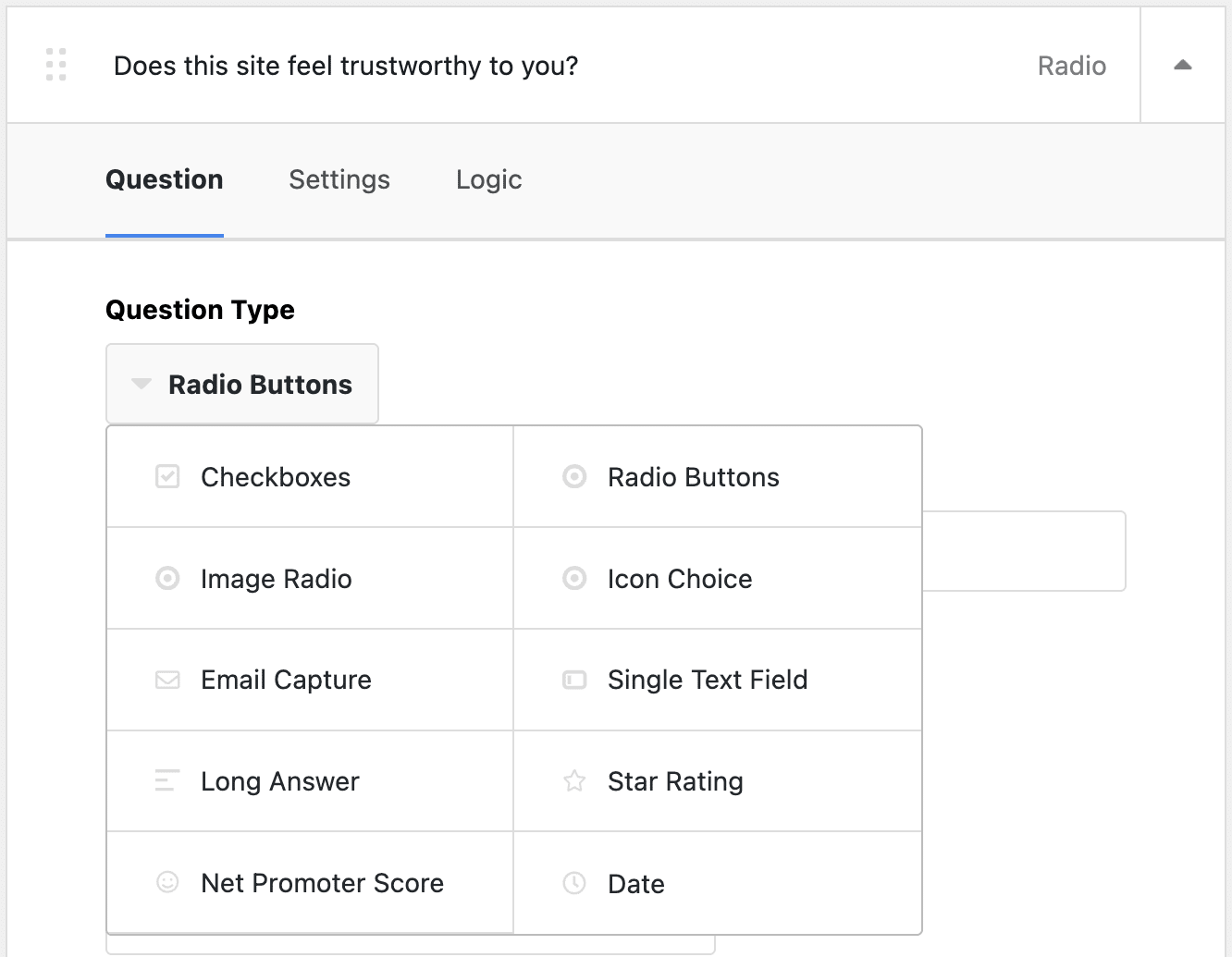
- A range of question types covering star ratings, single-select and multi-select lists, and open text, which is what the formats above need.
- Display logic so a question can appear based on how somebody answered an earlier one. That is what makes the Yes or No questions worth including, because the follow-up only shows when there is something to follow up on.
- Page-level targeting in the paid plans, so a question about a specific page only appears on that page.
- Custom branding in the paid plans, to match your own colors and logo.
- Reporting that collects responses in your dashboard, including the promoter and detractor breakdown for the recommendation question.
- A Google Analytics connection through MonsterInsights, so survey responses sit alongside the behavior that led to them.
Templates are worth a look before you build anything from scratch. There are 20+ premium templates, and if one of them is close to what you want, editing its wording is faster than assembling a survey question by question.
FAQs About Survey Question Examples
How many questions should a survey have?
Fewer than you want to ask. On-page surveys work best at one to three questions, because visitors are mid-task. Emailed surveys can carry eight or ten, because the person has chosen to open it. If a question would not change a decision you are going to make, cut it.
What makes a survey question good?
It asks about one thing, its answer options fit the question, and it assumes nothing about the person answering. A question that fails any of those three produces answers you cannot act on, even when people answer honestly.
Should I use open or closed questions?
Both, in that order. Closed questions are quick to answer and easy to count, so they belong early. Open questions produce the reasons behind the numbers, and they belong at the end, once somebody has already answered a few easy ones.
Can I copy these survey questions exactly?
Yes. Replace anything in square brackets that names your own product or category, and check that the answer options match how your own customers would think about the choice. The wording itself needs no changes.
How do I know if a question is biased?
Read it and ask whether one answer looks more expected than the others. If it does, the wording is doing the work rather than the respondent. Adjectives describing your own product are the most common cause.
When should I ask these questions?
As close as possible to the thing you are asking about. Post-purchase questions work within a day of the order, website questions work while somebody is still on the page, and product questions work after somebody has used the thing enough to have an opinion.
That’s it! I hope this article helped you find survey questions you can put to work straight away. If you liked this article, check out the following resources:
- Best Website Survey Templates and Examples
- Bad Survey Questions: 8 Types to Avoid (+ How to Fix Them)
- Types of Survey Questions: Complete Guide with Examples
- 44 Customer Survey Questions + Guide to Meaningful Feedback
- 10 Online Survey Examples to Get You Started
And remember to follow us on X and Facebook to learn more about online surveys, questions, and customer feedback.